


Download Spoon – Instant Access, Wide Application Range, Smooth Performance
Overview
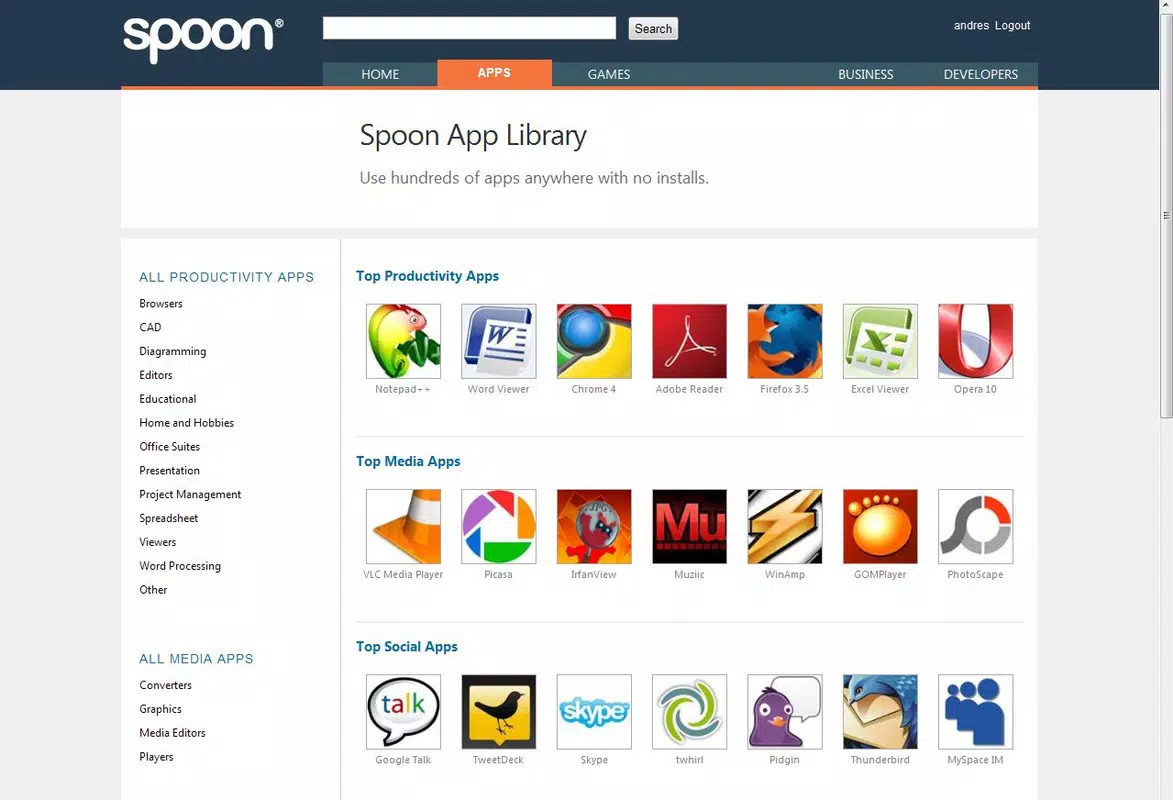
Spoon is a mobile application designed to streamline access to software and games by eliminating the need for traditional installation processes. The app enables users to run a variety of programs directly from their browser, offering a seamless alternative for those who require quick access to tools and entertainment without the overhead of local setup. By installing a lightweight plugin, users gain immediate entry to a broad selection of applications, including popular utilities like Winrar, Google Chrome, and Adobe Reader, as well as notable games such as World of Goo and Splinter Cell. This functionality makes Spoon particularly useful for temporary tasks, software testing, or on-the-go access to frequently used tools.
Target users include professionals needing rapid access to productivity software, students working across multiple devices, and casual gamers seeking a hassle-free way to play classic titles. The app operates within a browser-based environment, reducing dependency on device-specific configurations and simplifying cross-platform usage. Although the developer did not provide additional technical details, Spoon has been available since its release on October 8, 2010, indicating a long-standing presence in the digital utility space. Its continued relevance suggests a stable and reliable framework for remote application execution. The app fills a niche in the mobile ecosystem by offering a lightweight, plugin-driven solution for software access, positioning itself as a versatile utility for both work and leisure.
Key Features & Functionality
- Instant Access: Users can launch applications and games directly from their browser with minimal setup. The plugin-based architecture allows immediate execution without lengthy installation, ideal for time-sensitive tasks or temporary software needs.
- Wide Application Range: Spoon supports a diverse library of well-known software, including Winrar, Google Chrome, and Adobe Reader, making it a convenient one-stop solution for common productivity tools.
- Smooth Performance: Despite running in a browser environment, Spoon delivers fluid performance, minimizing lag and ensuring a responsive user experience during application use and gameplay.
- Diverse Game Selection: The platform includes a curated collection of classic and popular video games such as World of Goo and Splinter Cell, appealing to users who want quick access to entertainment without installing full game clients.
- User-Friendly Setup: The installation process for the Spoon plugin is designed to be quick and intuitive, allowing users to begin using the app in under a minute, even those with limited technical expertise.
For example, a student preparing for a presentation can instantly open Adobe Reader to review a PDF without installing the software on their device. Similarly, a gamer might access World of Goo during a break without downloading or updating a game client. These real-world scenarios highlight Spoon’s value as a flexible, on-demand tool for both professional and personal use.
Interface, UX & Performance
The user interface of Spoon is designed around simplicity and efficiency, focusing on rapid access rather than complex navigation. The app leverages a browser-based environment, which means the visual layout is consistent with web application standards—clean, minimal, and centered on application thumbnails or icons. Users are presented with a categorized list of available software and games, enabling quick selection and execution. Navigation is straightforward, relying on intuitive clicks and minimal user input, which supports accessibility across age groups and technical skill levels.
Although the developer did not list formal performance metrics, the app is described as delivering smooth and fluid performance, particularly for lightweight applications and older or less resource-intensive games. Responsiveness appears to be optimized for typical smartphone and tablet usage, though specific device compatibility was not disclosed. Stability is implied by the app’s long-standing availability since 2010, suggesting consistent operation over time. The plugin-based model may contribute to efficient memory usage and reduced system strain, though no details were provided on background processes or data handling. Overall, the UX emphasizes speed and ease of use, aligning with the app’s core promise of instant access.
Platform Compatibility & Technical Requirements
Spoon is available on Android and iOS platforms, supporting modern mobile operating systems. The app’s latest version is not specified, nor is the file size provided in the available information. The developer did not disclose minimum OS requirements or hardware specifications, leaving compatibility details incomplete. As such, users are advised to verify system requirements through official channels before installation.
Given the app’s browser-based execution model, it may function across a wide range of devices, but performance may vary depending on network speed, device processing power, and browser capabilities. The lack of detailed technical specifications means users should approach installation with caution and ensure their device meets general mobile standards for web application support. The absence of specific release notes or update frequency details also limits insight into ongoing development and security patches.
Pros and Cons
Pros
- Eliminates the need for local software installation
- Offers instant access to a wide variety of applications and games
- Designed for quick setup and ease of use
- Delivers smooth performance for lightweight applications and games
- Supports cross-device usage through browser-based access
Cons
- Specific system requirements were not listed
- Performance may vary depending on network and device capabilities
- Limited information on security protocols and data handling
- No details on update frequency or long-term development plans
- Compatibility with newer OS versions is not confirmed
FAQ
Is Spoon safe to install on my smartphone?
The developer did not provide detailed information on security protocols or data encryption. Users should ensure they download the app from official sources and review permissions carefully before installation.
Can I use Spoon without an internet connection?
As Spoon relies on a browser-based execution model, an active internet connection is required to access applications and games. Offline functionality was not mentioned.
Does Spoon work on both Android and iOS?
Yes, Spoon is available on both Android and iOS platforms, though specific OS version compatibility was not disclosed.
How do I update Spoon to the latest version?
Update availability and process were not specified. Users should check official channels for the most current version and installation instructions.
Is Spoon free to download and use?
While the app is available for download, the pricing structure was not provided. Users should verify the cost through official sources before installation.
Final Thoughts
Spoon stands out as a unique utility in the mobile app landscape by offering a plugin-driven, browser-based approach to software access. Its ability to deliver instant access to a wide range of applications and games without installation makes it a valuable tool for users seeking flexibility and speed. While detailed technical information is limited, the app’s long-standing presence since 2010 suggests reliability and sustained functionality. It is especially beneficial for professionals, students, and casual gamers who need quick access to tools and entertainment without the burden of local setup.
Despite some gaps in transparency regarding performance, security, and compatibility, Spoon’s core value proposition remains strong. For those prioritizing convenience and cross-device accessibility, the app offers a compelling alternative to traditional software installation. With its user-friendly design and diverse functionality, Spoon continues to serve as a practical solution in the evolving digital ecosystem.
Download Spoon now


